A product model can outlive its first campaign. The problem is that its images may outlive the product revision they show. A summer room scene, an autumn email and a retailer’s product page can quietly end up displaying three different versions of what is supposed to be the same table.
Useful reuse starts with a distinction: the product is an approved asset; the room, camera and layout are presentations of it. Keep their revisions separate, then make each exported image traceable to both. This guide develops a proposed workflow for a fictional side table, rather than reporting a client’s campaign results.
Give the product a stable identity
Our example has a round top, three legs and a removable lower tray. Before arranging the room, record the approved drawing revision, dimensions, finishes and which parts are included. Name the master asset accordingly. A useful name identifies the product and revision; “final-final” only describes someone’s hope that the work has ended.
Now separate the table from the objects around it. A book on the tray is a prop. The tray itself belongs to the product only if the specification says so. A room scene can make those distinctions harder to see, which is why the product record must exist independently of the scene.
Maintain a small delivery register: product revision, scene revision, variant, crop, destination and approval. It can be a spreadsheet. Its value is the ability to answer “Where is the old tray still visible?” without reopening every image and guessing.
Plan three different jobs for the same asset
For this table, consider a neutral product page, a furnished-room campaign and an explanatory detail for an email. These are three proposed editorial uses, not a claim that three channels are optimal.
- Product page: show the complete configuration and a view that makes the removable tray understandable. Link the image to the correct variant.
- Room campaign: show why the table belongs beside a chair without hiding its legs or implying that surrounding props are supplied.
- Email detail: select the tray or another relevant feature and give the reader a destination that explains it. A decorative crop should not imply a feature absent from the product page.
Approve compositions at their intended size. Cropping the room image into a narrow banner may remove the tray entirely. The asset has been reused, but the explanation has disappeared. Prepare a different camera or composition when the destination needs it; the resolution guide covers the relationship between output dimensions and crop.
Choose how a revision travels
In Blender 4.5, Link and Append have different implications. Linking references data in another file and can bring source changes into a scene when reloaded. Appending makes a local copy without that continuing reference. Those behaviours support different production choices; neither replaces approval.
For a family of scenes intended to stay current, a linked master can make the relationship explicit. For an approved historical campaign, retain a reproducible version of the source and its dependencies. Otherwise, reopening an old scene against a changed master may no longer reproduce the approved image. This is a workflow recommendation based on the documented dependency, not a reported software test.
Do not confuse a changed model with a changed delivered file. Exported images are separate files. If the tray becomes shallower, identify the affected scenes, review them and produce replacement exports. Then check which destinations actually received those replacements.
Follow one change all the way to publication
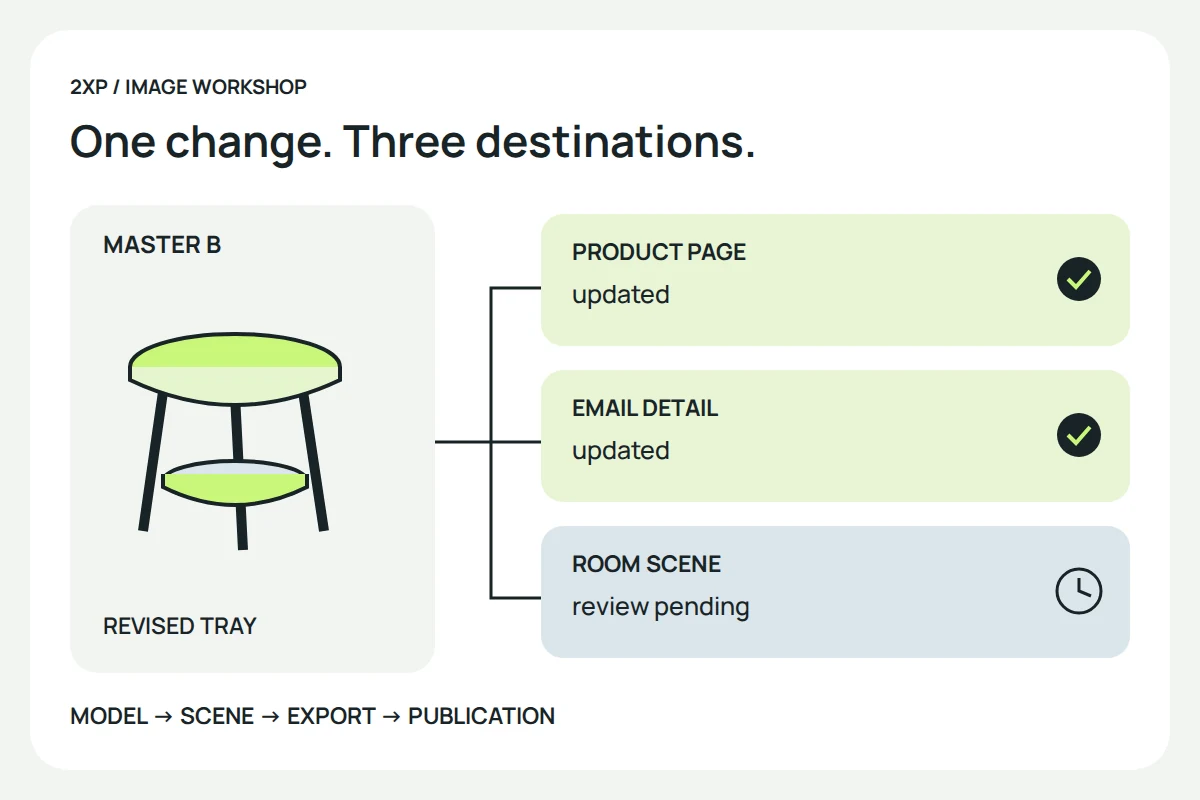
Suppose the approved tray changes from revision A to revision B. In this imaginary job, the product page shows it clearly, the email uses a close-up and the room scene contains it in the background. All three need review, even though the change is less conspicuous in the room.
A practical change record could read: “Tray depth revised; product model B approved; product-page and email images replaced; room scene awaiting review.” That last phrase is useful. It prevents the completion of one task from being mistaken for completion of the campaign.
The reviewer should compare the actual published asset, not only a file on the designer’s computer. Check the page, the resized image and the link destination. Keep the superseded export identifiable in the working archive so it cannot be mistaken for the current release.
Reuse changes the work; it does not remove it
A reusable model can avoid rebuilding the same geometry, but the work required for the next campaign still needs to be scoped.
A new campaign can still need scene design, reference updates, lighting, crops, rendering, retouching, review and publication. Agree which source files, texture dependencies and intended uses form part of the handoff. A folder containing only finished images is a different deliverable from a scene that another artist can reopen.
When comparing a new scene with photography, use the furniture production comparison. It separates physical evidence from model construction instead of assuming that one method always costs less.
Ask whether the image answered its question
Before release, ask a reviewer to identify the supplied parts, the variant and the feature the image is meant to explain. Record any ambiguity and revise it. That is a proposed comprehension check, not proof of demand or a substitute for research with actual customers.
After release, record what changed in the campaign before interpreting clicks or enquiries. A new price, audience or landing page can change the result alongside the image. This guide reports no measured uplift. Its immediate deliverable is simpler: a reusable asset, a visible revision history and a list of places that still need updating.
Historical context: the former studio’s product-marketing article discussed reusing models and changing settings. This new analysis replaces its blanket savings and sales claims with an explicit revision workflow. No former client project or original campaign image is presented as our own.